FREE OPEN-SOURCE MACBOOK NOTCH APP

A living island
for your Mac.

Bookland turns the space beside your MacBook camera into a Dynamic Island-style Liquid Glass workspace. Hover for compatible media controls, your calendar, files, focus tools, and connected Codex activity. Move away, and the island folds closed.

Apple Silicon · macOS 26 or later · Free and open source · Locally signed preview 0.1.4 · Installation steps

CAPTURED ON A MACTHE BOOKLAND NOOK
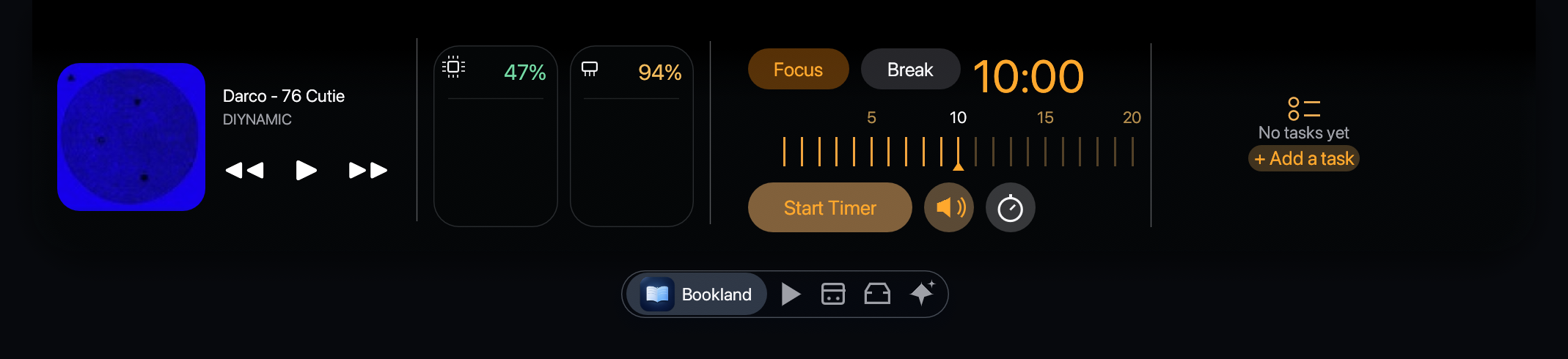
The running Bookland island open around the Mac camera, with music, system pulse, focus timer, tasks and a floating workspace menu
One hover. Your day, right there.Actual app capture · macOS Liquid Glass
SEE THE REAL MAC APP00:25
From the camera to your workflow.An edited tour of real Bookland captures, hosted by the illustrated Guide with AI-generated Adrian narration.

THE EXPERIENCE

Right there when you need it.
Out of the way when you don’t.

Bookland lives at the top edge of macOS. Hover to open its Liquid Glass panel, switch workspaces in the floating pill, or click to keep it open.

BooklandMon 23 Nov · 10:24
NOW PLAYINGStudio SessionDemo audio
PULSE28%CPU
FOCUS10:00Start timer
TO-DOKeep the day moving.Quick tasks, one glance away.

Swipe the workspaces to explore

Interactive illustration with sample content. The macOS app uses native system materials and your own data.

CAPTURED ON A MAC

The real Bookland.
At the top of the screen.

These are captures from the current macOS build. The island uses native system material, so its glass responds to the desktop behind it.

NookMusic, focus, and a quick system pulse in one glance.
MusicTracks, 15-second seeks, and volume beside the camera.
CalendarSee the month and event markers from calendars connected to macOS.
Tray & PocketKeep files and clipboard history within reach.
PromptsTurn a spreadsheet task into a reusable prompt.

SEE IT MOVE

See the island work.
Right beside the camera.

Start with a recorded Mac session: Bookland opens, moves a video back 15 seconds, and closes again. Then explore three short films about the island, Codex, and music.

One action. No tab hunt.Real Bookland footage · 22 seconds

THE REAL MAC DEMO

Watch one small action change the flow.

In this recorded session, the pointer reaches the island, a 15-second seek changes the video, and the island folds away when the pointer leaves. Browser media detection can vary in the current preview.

Recorded on macOSControl and result in one takeNative Liquid Glass panel
Try the open-source preview ↗

THREE SHORT STORIES

A closer look at Bookland.

25-second films with real Bookland captures, Adrian narration, and motion in Bookland's ink, glass blue, and ice palette.

Swipe to watch all three films

BUILD WITH US · DAYS 001–004

Meet the Bookland Guide.

Follow the Guide as we build this open-source island in public. Start with a 25-second walkthrough of the real Mac app, then see what changed each day. Tell us what should improve next.

Watching on social? Comment BOOKLAND for the preview link. We reply to real comments ourselves.

Day 001: the island is open.25-second brand film · real app capture and animated Guide
DAY 002 · MUSIC

Three apps. One glance.

Watch the Guide show a working music control in the island, then ask what belongs there next.

Suggest a feature ↗
DAY 003 · FOCUS

Ten minutes, right here.

A real focus timer beside the camera. The Guide invites you to shape the next small improvement.

Explore the source ↗
DAY 004 · CODEX

The answer lands in the island.

Watch a connected Codex turn finish beside the camera in a real Mac capture. Other desktop turns may stay in Codex.

Tell us what to improve ↗
DAY 004 · MUSIC

Missed that line? Back fifteen.

The recorded Chrome media session moves from 00:45 to 00:30 with one island control. Support varies by media source.

See the open source app ↗
DAY 004 · CALENDAR

Event days, one glance away.

Blue dots mark dates with events in Bookland’s real Calendar panel. Select a day while your work stays underneath.

Suggest the next detail ↗

IN DEVELOPMENT · NOT RELEASED

What changed
since 0.1.4?

Watch a 26-second first look recorded from an isolated v2 build on a Mac. The available download is still 0.1.4.

  • Reorder and hide island shortcuts.
  • Choose the current audio output from Music.
  • Open optional Claude and Grok chat panels. Live keyed replies still need verification.
  • See the actual playhead restored if a browser ignores a rewind. Browser support varies.
Real v2 app captures · development preview · 26 seconds

WHAT'S INSIDE

One small place.
A lot of useful moments.

♫

Stay with the music.

Control the current macOS media session, scrub the timeline, see artwork, and optionally follow synced lyrics. System playback also covers supported browser sessions.

▣

See the day clearly.

Browse a month with event dots and filter by date. Bookland reads the calendars already connected to macOS, including Google calendars, with permission.

Uses your macOS Calendar accounts
✦

Keep an eye on Codex.

Follow local Codex activity at a glance. Bookland-connected turns can surface questions and approval choices in the island.

Connected turns only for approvals
▤

Files within reach.

Tray and Pocket hold recent files for quick access, copying, conversion, and AirDrop handoff. Nothing needs a separate cloud account.

◷

Make room to focus.

Keep a Pomodoro timer, to-dos, and a compact system pulse beside your media controls. Arrange the Nook widgets to suit your day.

THE SMALL DETAILS

Made to feel at home
at the top of the screen.

Hover and it opens. The closed strip wraps the camera cutout, then expands with a native animated silhouette.

Choose what you need. A compact floating pill switches between music, Calendar, Tray, and Agents.

Move on. The island closes after you leave. Right-click and choose Open Nook when you want to keep it open.

FREE AND OPEN SOURCE

Built in the open.
Yours to explore.

Bookland is an independent macOS project, written in Rust with native AppKit and Core Animation bridges. There is no Bookland trial, subscription, or account. Bookland's source code is MIT licensed. Read the source, build it, report what you find, or help shape what comes next.

Build from source
$ git clone https://github.com/KyrocEU/bookland.git
$ cd bookland
$ cargo test
$ sh package.sh
$ open Bookland.app

Requires macOS 26+, Xcode Command Line Tools, CMake, and Rust. The local source build is ad hoc signed and is not notarized.

TRY THE PREVIEW

From download to island.

Apple Silicon and macOS 26 or later. No Bookland account or subscription needed.

  1. 01
    Download

    Get the 0.1.4 ZIP from GitHub. The release page includes its SHA-256 checksum.

  2. 02
    Move to Applications

    Extract the ZIP, drag Bookland.app into Applications, then try opening it once.

  3. 03
    Hover beside the camera

    Bookland appears at the top edge instead of in the Dock. Hover over the island to open it.

This preview is not Apple-notarized. If macOS blocks the first launch, review the source and checksum before choosing Apple’s documented Open Anyway option in System Settings → Privacy & Security.

GOOD TO KNOW

A few honest answers.

What is Bookland?

Bookland is a free, MIT-licensed MacBook notch app. It opens a small Liquid Glass workspace beside the camera when you hover, with compatible media controls, Calendar, files, focus tools, and connected Codex activity. Its source and macOS preview are available on GitHub.

Is Bookland a Dynamic Island for Mac?

Bookland is an independent macOS app that draws an interactive island around the MacBook camera area. Hover to open it, then move away to close it. It is not an Apple feature or an iPhone Dynamic Island port.

Do I need a Mac with a camera notch?

Bookland anchors at the top edge of a MacBook display and wraps its camera cutout. You can also target a connected display, where Bookland draws a rounded island. The current build shows one island at a time.

Is Bookland a free alternative to NotchNook or Canopy?

Bookland is independent and free to use and modify under the MIT license. It currently requires Apple Silicon and macOS 26 or later. NotchNook and Canopy have different features and Mac compatibility; see the current comparison and source links before choosing.

Does Bookland control YouTube in Chrome?

Bookland follows compatible macOS Now Playing sessions. A recorded demo shows a 15-second video seek, but the current preview does not detect every Chrome YouTube session. We are tracking that browser media issue openly.

Does it connect to Google Calendar?

Bookland reads calendars connected through macOS Calendar, including a Google calendar, after you grant macOS Calendar access and select one in the app. The Calendar permission flow is still being validated for the current build. Bookland does not store a Google password or OAuth token.

Can I approve every Codex request from Bookland?

Bookland can show decisions for turns started through its Codex connection. Requests from turns already running in the Codex desktop app do not currently flow into Bookland.

Is this NotchNook?

No. Bookland is an independent open-source project inspired by the idea of a Mac hover island. It is not affiliated with NotchNook or OpenAI, and it does not claim full feature parity.
Swipe to inspect the actual app capture